A CRM for pest control connects customer contacts, service properties, recurring work, appointment communication and billing. The right system helps the office deliver the service the customer expects, from the first conversation through the next visit and payment.
Solea brings that customer relationship into an end-to-end AI-native pest control platform. AI handles routine appointment conversations and schedule preparation, with automation across payments, collections and AI-assisted reporting. It is built for companies with 5+ technicians, from mid-market teams through enterprise operators, so the office can spend more time on customer experience as the business grows.
What should a pest control CRM manage?
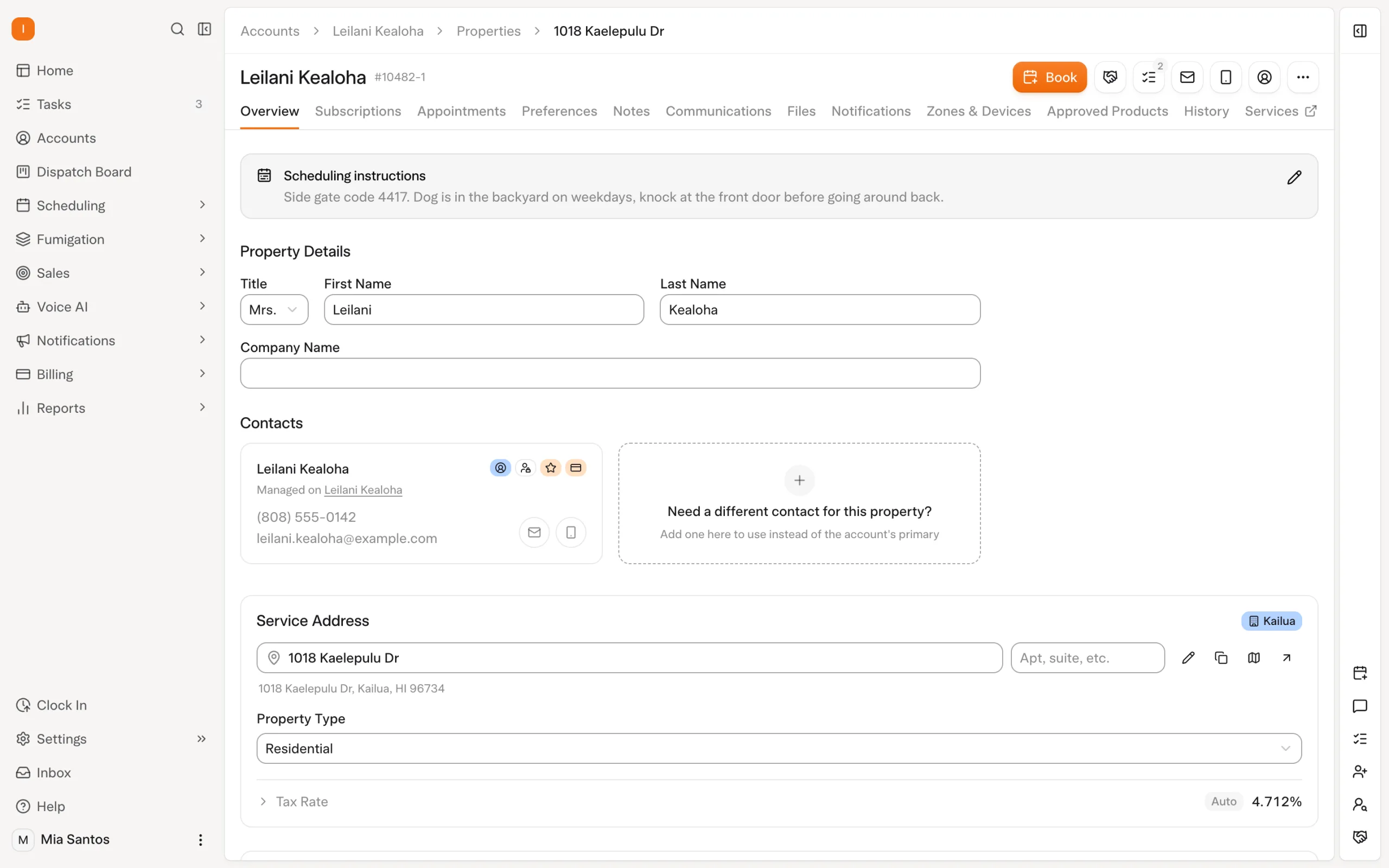
Pest control relationships continue across visits. A homeowner may have recurring service at one address. A property manager may arrange work at several locations, with a different person receiving the invoices. The CRM needs to keep those relationships clear as scheduling, service and billing happen.
In Solea, accounts and properties provide that foundation. AI scheduling and appointment handling operate within the wider service workflow, while billing automation uses the account’s payment and notification settings. Accurate records give that automation the right context.
| Customer information | Why it matters to the service workflow |
|---|---|
| Account and contacts | Identify the customer and the people involved in communication and billing. |
| Service properties | Keep the place being treated distinct from the person or business responsible for it. |
| Recurring service | Connect the ongoing service relationship with the appointments the team needs to deliver. |
| Scheduling preferences | Give scheduling the customer's constraints alongside technician availability and required skills. |
| Field notes and service records | Give the team context for the visit and the next customer conversation. |
| Invoices and payments | Connect completed work with what was billed, collected or remains outstanding. |
Explore Solea’s customer management.
How Solea is different
Solea combines customer management with an AI-run pest control office. The customer record sits inside the same platform as AI voice, AI scheduling, technician work, payments, collections and reporting. The aim is to automate the routine back-office work surrounding the relationship, giving your team more time for customers who need their attention.
An appointment request can be handled by the AI voice agent within the actions and rules your business enables. Scheduling optimization prepares upcoming routes around operating constraints. After service, configured payment and notification workflows take care of routine billing steps. AI-assisted reporting supports the team’s review of the business.
Your team sets the rules and handles exceptions. That includes deciding what the voice agent can do, which appointments must stay fixed, and how customers receive service and billing communication. Those controls are part of delivering a reliable customer experience.
See how Solea’s AI-native field service platform works.
Follow one customer through the platform
Keep the account and the service address connected
Consider a property manager responsible for three buildings. This is an illustrative example, not a customer case study. The account identifies the customer relationship, while the properties identify the places your technicians visit.
Solea supports multiple properties under one account. This lets the office keep location-specific service information distinct while working with the customer relationship. Within the AI-native workflow, that structure supports clear scheduling context and the correct routing of automated notices.
Service and billing communication have different destinations. Solea’s documented routing uses the property’s email for service notices and account contact roles for billing communication. This matters when the person opening the gate is not the person paying the invoice.
Let AI handle routine appointment calls
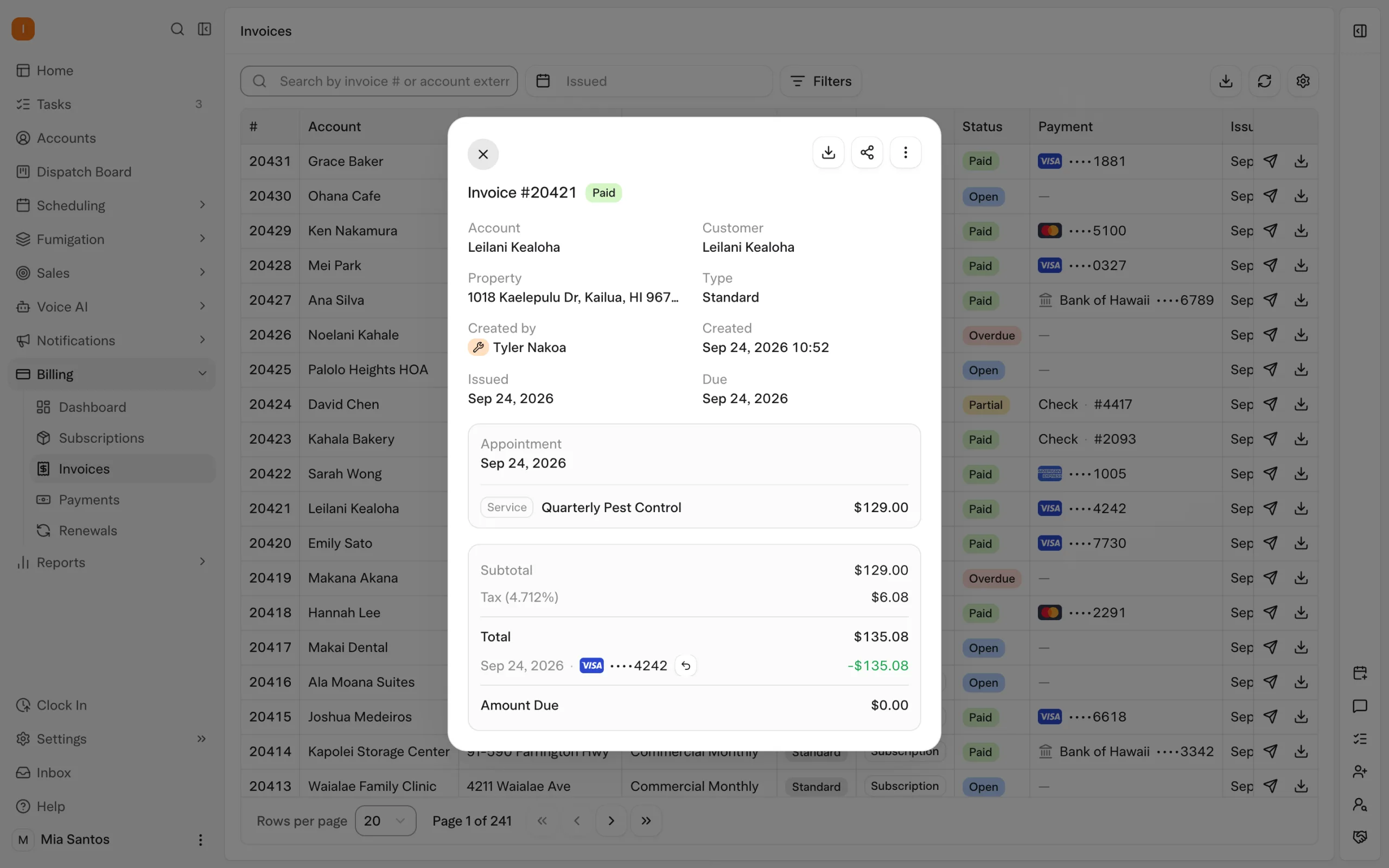
A customer calls to change a visit. Solea’s AI voice agent can handle enabled booking, rescheduling and cancellation requests under the configured rules. A request that needs a person follows the configured handoff.
The office decides which actions are enabled and how transfers work during and outside office hours. The benefit is a customer who can get routine appointment help without every call becoming another item for the office to complete. Explore AI voice.
Turn customer constraints into an AI-built schedule
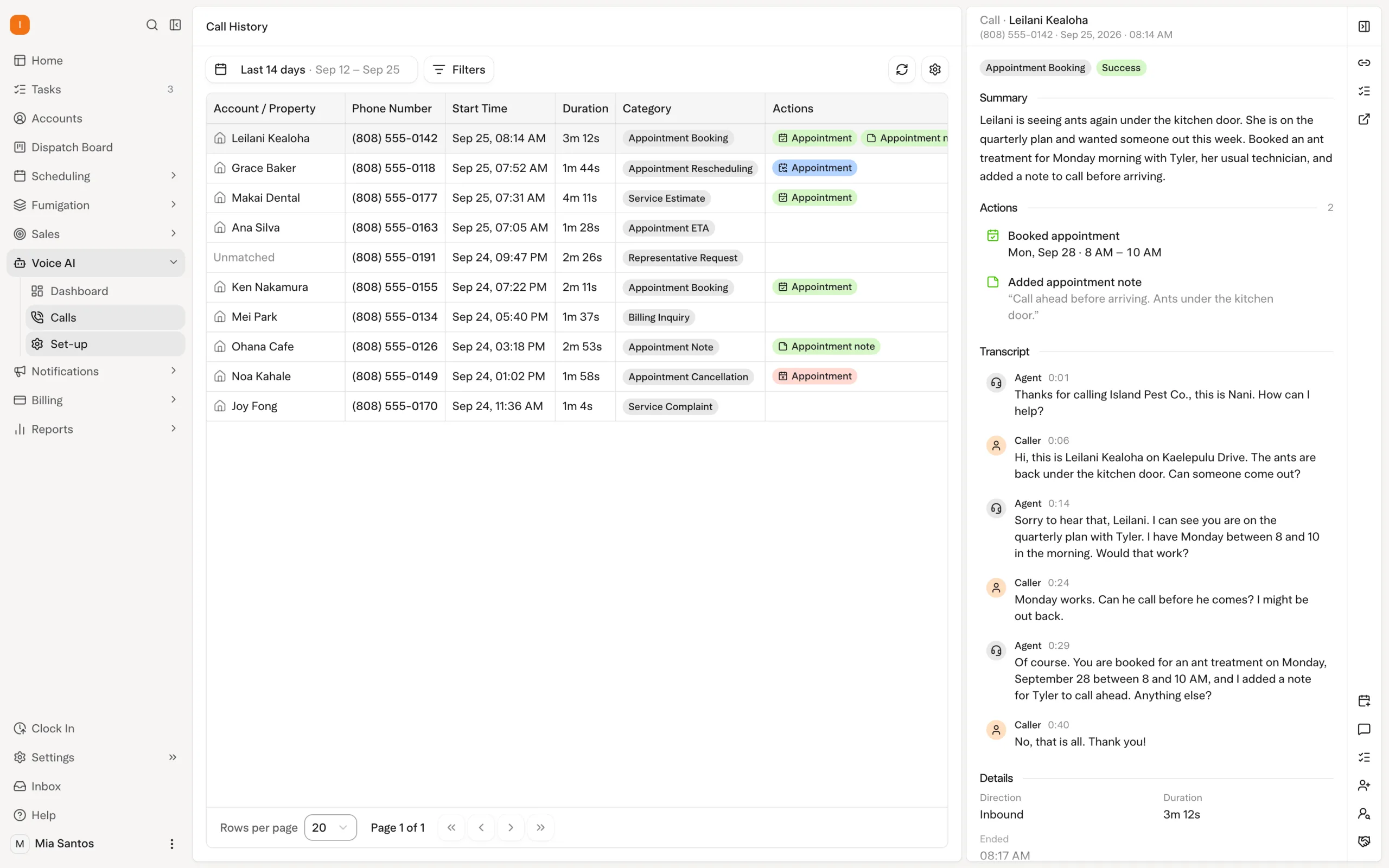
A customer’s availability needs to work alongside the technician’s shift, required skills and travel between stops. Solea’s AI scheduling optimization uses these constraints when planning upcoming work.
Locks protect appointments that should remain fixed, and the freeze window keeps near-term visits out of the nightly optimization. The office can preview an optimization as a dry run. This gives the team a way to evaluate the proposed schedule while maintaining control over customer commitments.
When comparing systems, include a flexible visit and a confirmed appointment in the same example. Look at how the software prepares the work and protects the promise already made to the customer. Explore scheduling and dispatch.
Carry the service into payment and follow-up
The technician records what happened at the property. Those service records connect field delivery with the wider AI office workflow, giving the team context for questions and follow-up.
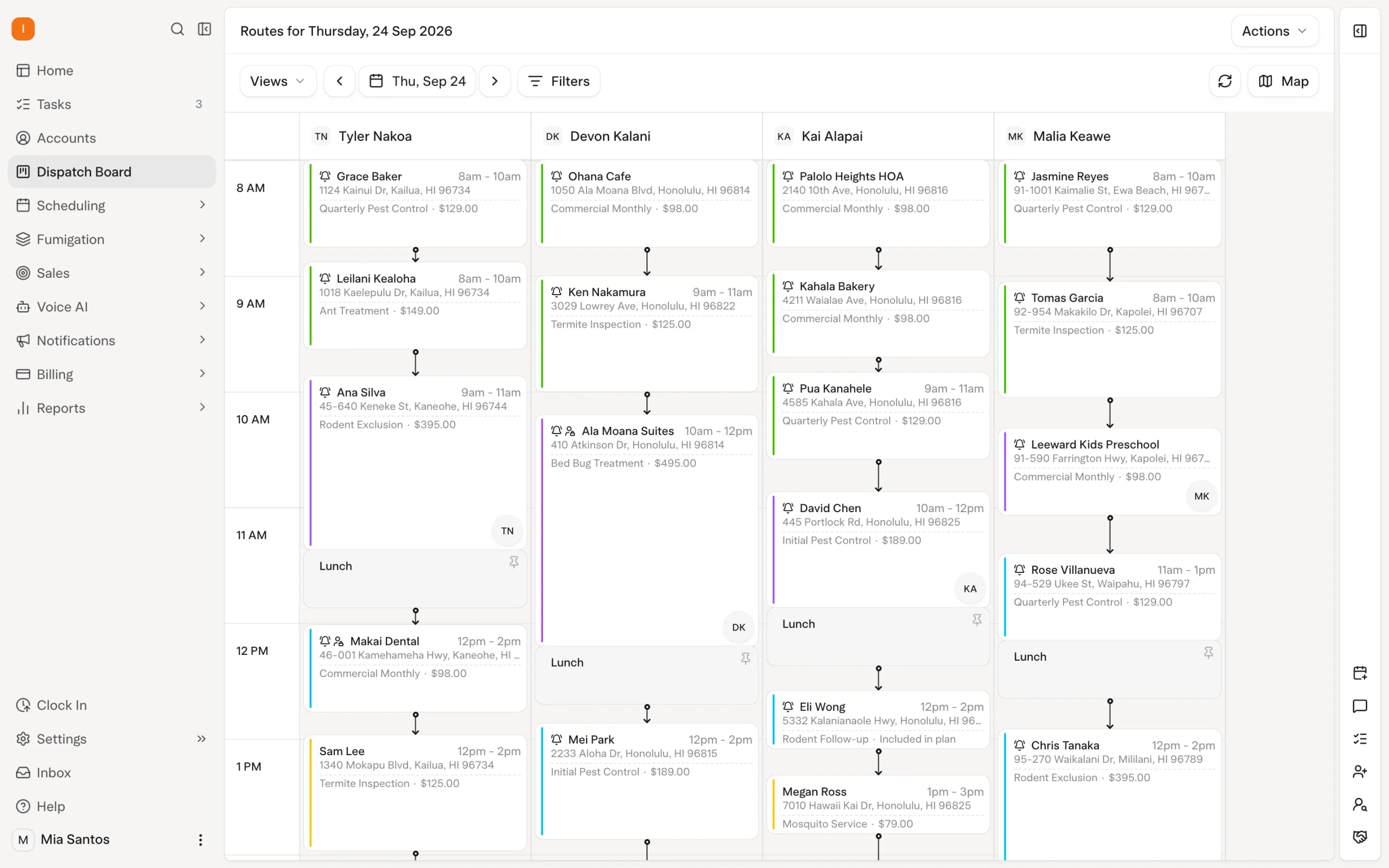
Solea extends automation across payments and collections. With auto-charge configured, a saved payment method can be charged after completion. A paid-invoice notification can send the receipt. Overdue reminders can follow configured timing and filters, with notification preferences controlled for individual accounts or properties.
That reduces the routine work of taking payment and sending reminders. The office can focus on customers who need a conversation about the service or their balance. Explore billing and payments.
Review the business with AI-assisted reporting
Solea’s AI-native approach also includes reporting. For a CRM evaluation, start with the management decisions you need to make, then ask to see how the reporting supports them using the underlying business records.
One useful question is whether the work you billed has become collected revenue. Solea’s documented Billing Aggregate workflow compares billing with collections. Use that distinction when reviewing the customer relationship: an invoice raised and a payment received represent different points in the service cycle.
Bring a real reporting question to the demonstration and check the date range and meaning of the figures. AI-assisted reporting is most useful when the team understands the records behind its decisions.
How to choose a CRM for your pest control company
For a team with 5–50 technicians, evaluate how much routine office work the platform can complete as recurring customers and daily appointments grow. For an enterprise operation, also demonstrate the office structure, access requirements and reporting scope you need. Solea serves both mid-market and enterprise teams; technician count is a starting point for the evaluation, not the whole decision.
Use the same customer example across the demonstration. A feature list cannot show whether the person handling a call, the technician and the billing team can work through the service relationship coherently.
| Scenario | What to demonstrate |
|---|---|
| One customer manages several properties | Show where contacts, property instructions and billing information belong. |
| A customer calls to change a visit | Let AI handle an enabled request, then show the handoff for a request outside its rules. |
| A visit requires a qualified technician | Show how scheduling optimization respects skills and protects an already confirmed appointment. |
| Service is complete and payment is due | Show the configured auto-charge, receipt and overdue reminder workflows. |
| A manager needs to review collections | Compare billed amounts with collected payments and explain the reporting scope. |
A useful commercial comparison includes the software quote, payment-processing terms, implementation scope and the office work each workflow automates. Request a quote based on your operation.
Moving customer relationships into a new CRM
Before switching, agree how accounts, properties, recurring services, open balances and customer preferences will be mapped and checked. Treat this as an acceptance checklist for your migration, not an assumption that every field transfers automatically.
Test a straightforward residential account and a more complex customer with multiple properties. Include separate service and billing contacts, a confirmed visit and an outstanding invoice. Confirm the automation settings against those examples before relying on them in daily work.
Use the pest control software migration checklist to organize the review. For a customer example, read Pest Tech Hawaii’s Solea story.
Give the office more time for customers
A pest control CRM should help your team carry the customer relationship through each service cycle. Solea brings that relationship into an end-to-end AI-native platform, automating routine office work across appointment calls, scheduling, payments and collections, with AI-assisted reporting for management review.
Request a demo using your own service mix, customer examples and office workflows.
Frequently asked questions
What is a CRM for pest control?
A CRM for pest control organizes customer contacts, service properties, recurring work, communication and billing information. In an end-to-end platform such as Solea, those records connect with AI appointment handling, scheduling and payment workflows so the office can manage the relationship across the service cycle.
Does Solea include CRM and field service management?
Yes. Solea connects customer management with AI voice, scheduling, technician work, payments, collections and reporting in one platform. It is built for pest control companies with 5+ technicians, from mid-market through enterprise. The customer relationship remains connected to the work the office and field team deliver.
How does AI help with pest control customer management?
In Solea, AI handles enabled appointment conversations and prepares schedules within configured rules. Payments and collections automation carry out routine billing actions, while AI-assisted reporting supports management review. Staff set the operating rules and handle exceptions, giving them more time for customers who need a person.
Can one customer have multiple service properties?
Yes. Solea supports multiple properties under one account. That separates the customer relationship from the locations being serviced. The structure is useful when one customer manages several addresses or when service notices and billing communication need to reach different people through the configured contact and notification settings.
Can a pest control CRM automate recurring customer work?
It should connect the recurring service relationship to scheduling, communication and billing. In Solea, evaluate the service setup alongside AI scheduling, appointment handling, auto-charge and notification settings. Ask to follow a complete service cycle so you can see which actions are automated and where your team intervenes.
What should we check before switching pest control CRMs?
Agree the mapping and validation of accounts, properties, recurring work, balances and preferences. Test representative customer records and confirm scheduling, payment and notification settings. Include complex accounts as well as simple ones, and agree how the team will handle exceptions before cutover.
 Overnight